Tableau how to remove ‘abc’

2 approaches-

Approach1#
1. select abc
2. go to color and change opacity from 100% to 0%. this would hide text ‘abc’
3. now right click on column next to abc, go to format-> Column Divider-> pane-> none
4. now reduce the size of abc column as minimal as possible. so user wont be able to see it.

Approach2#

Create a new blank column with text ‘ ‘. Drag this column and repeat above steps – 3,4.

Detailed video is also available at youtube.
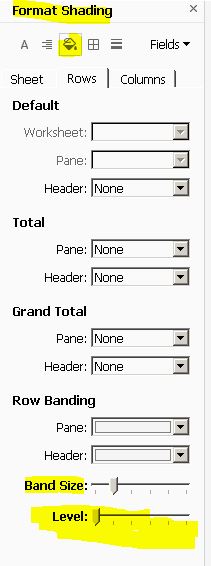
tableau how to add filter at dashboard

If a worksheet had a filter and you drag that sheet into dashboard, filter will show up on dashboard. But if you had added filter at sheet later after adding sheet to dashboard this new filter will not show up automatically.
Follow below steps to get the filter added.

Go to Dashboard
select the required sheet
click on drop down menu
go to “Filters”
select required fields which you want to add as filter. This will show up on dashboard.

Tableau- how to disable auto grouping in Tableau

There is no option as such in Tableau to disable auto grouping.
But there is work around.
two ways you could achieve this
1. Create index() and drag this as your first row item. Now you shouldn’t be seeing any grouping. To hide this field at index() drop down uncheck “show header”
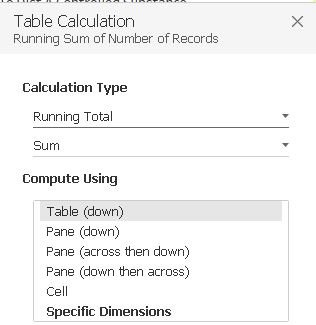
2. Drag “Number of Records” measure as first row. Do a quick table calculation as — running total, sum, table down. This would give similar data like index(). And data is not grouped anymore. To hide this field uncheck “show header”

Tableau disable auto-grouping

.