Blog

Cognos how to customize search and select prompt

Cognos How to resize Select and Search prompts
Cognos How to change the default prompt option of search and select

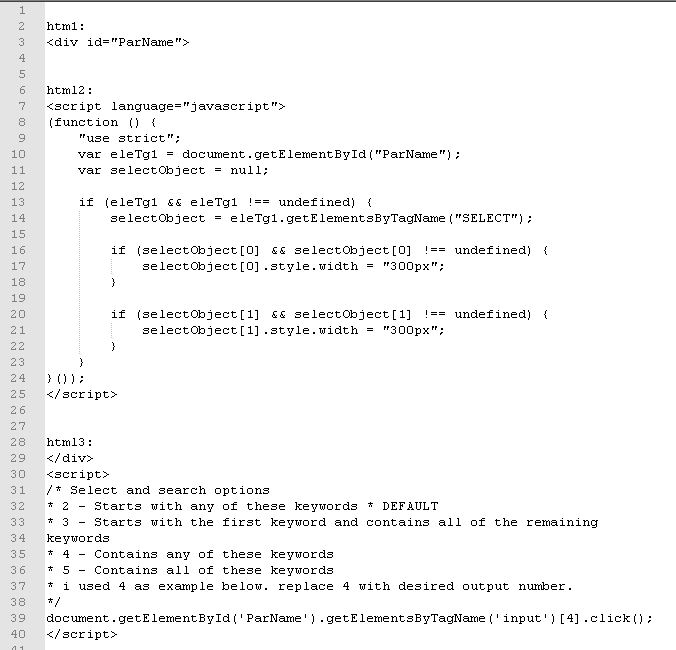
use html2 for resize
use html3 for  default option to contains

add 3 html items. 1 item before prompt and 2 items after prompt.

Prompt name say” ParName”

cognos customize search and select prompt

cognos customize search and select prompt html code

source:
http://www-01.ibm.com/support/docview.wss?uid=swg21341018

Quickie: Changing default option in a Select and Search Prompt


https://www-01.ibm.com/support/docview.wss?uid=swg21902305
https://www.cognoise.com/index.php?topic=26076.0


Pass data item/query item into Hyperlink. How to get Google maps links at Cognos.

For this example I am using google maps.
Google maps URL –
https://www.google.com/maps/search/?api=1&query=58.698017,-152.522067

Create 2 query items with latitude and longitude. Say [Query Item Latitude], [Query Item Longitude]
create a new data item say – [Query Item_google maps url] with
https://www.google.com/maps/search/?api=1&query= ‘ ||cast([Query Item Latitude] as varchar(10))||’,’|| cast([Query Item Longitude] as varchar(10))

at report studio drag hyperlink to your list report.
Select Hyperlink and change properties as follows
Source type – Data Item value
Data Item Value – [Query Item_google maps url]
Googlemaps

Run the report. You should be able to get to google maps from the hyperlink.

Another google map URL you can play with –
https://maps.google.com/?hl=en&ll={LATITUDE},{LONGITUDE}&t=m&z=19&vpsrc=6&layer=c&cbll={LATITUDE},{LONGITUDE}&cbp=12,15.61,,0,0

Here is the URL API guide from google: https://developers.google.com/maps/documentation/urls/guide

SQL Server dates

to get different type of dates based on a date.

select
getdate()
, cast(cast(getdate() as date) as datetime) today_00hrs
, dateadd(dd,-1, cast(getdate() as date)) as yesterday_date
, cast(dateadd(dd,-1, cast(getdate() as date)) as datetime) as yesterday_00hrs
, DATEADD(yy, DATEDIFF(yy, 0, GETDATE()), 0) AS StartOfYear
, DATEADD(MONTH, DATEDIFF(MONTH, 0, GETDATE()), 0) as StartOfMonth
, (DATEADD(MONTH, DATEDIFF(MONTH, 0, GETDATE())-1, 0)) StartOfLastMonth
, DATEADD(MONTH, DATEDIFF(MONTH, 0, GETDATE())-3, 0) as Startof3monthsback
, DATEPART(week, GETDATE())weekofdate
, DATEADD(yy,-1,getdate() ) LastYearSameDateTime
, (DATEADD(MONTH, DATEDIFF(MONTH, 0, GETDATE())-1, 0)) LastMonth_1stday00hrs
, DATEADD(MONTH, DATEDIFF(MONTH, 0, GETDATE()), 0) CurrentMonth_1stday00hrs
,  DATENAME(year, ’12:10:30.123′)
,DATENAME(month, ’12:10:30.123′)
,DATENAME(day, ’12:10:30.123′)
,DATENAME(dayofyear, ’12:10:30.123′)
,DATENAME(weekday, ’12:10:30.123′);

cognos dates

_first_of_month(_add_months(current_date,-3)) — 1st of last 3rd month i.e. for march 10th 2018 you will get output as Dec 1st 2017

 
— end of last month
-Last day of the previous month can be determined by using the following expression:
_last_of_month(_add_months(current_date,-1))

-First day of the previous month can be determined by using the following expression:
_first_of_month(_add_months(current_date,-1))

–current date
current_date

–current date-1 or yesterday date
_add_days ( current_date, -1)

— current year last 7th day
_add_days ( current_date, -7)

–current year
extract (year, current_date)

— current year First Day of Year
_add_days(Current_date , (_day_of_year(Current_date)*-1)+1 )

–CY Total Days till today
_day_of_year (current_date)

–CY Total Days till last 7th day
_day_of_year (_add_days(current_date,-7))

— CY First Day of Current Month
_first_of_month ( current_date)

source:
https://www-01.ibm.com/support/docview.wss?uid=swg21340206

float to nvarchar in sql server

when you need to select from one column of datatype float(which has phone number) and insert it in another column as nvarchar- cast wont work

cast : cast([Column_Name] as nvarchar(50)). The result will be in format 9.07235e+009 instead of a 10 digit number (phone number).

use SELECT STR([Column_Name],10,0) ** This is SQL Server solution, for other servers check their docs

Cognos cross tab percentages


How to get percentages in cognos cross tab

I need to calculate % for count distinct value. to do this in the query we need 3 data items.
data item 1 – count (distinct item_id) . solve order 1
data item 2 – count(distinct item_id for report) . solve order 2
data item 3 – data item 1/ data item 2

use data item 3 in your crosstab and format it as percentage.