create a new query subject based on below calculation
running-count (
count(
distinct
[querysubject]
)
for [querysubject_category]
)
use the above query subject as filter and set filter application to – “After Auto Aggregation”
find better solutions for analytics world
create a new query subject based on below calculation
running-count (
count(
distinct
[querysubject]
)
for [querysubject_category]
)
use the above query subject as filter and set filter application to – “After Auto Aggregation”
cmplst.txt file at cognos installation folder will give this information.
Source article –
http://www-01.ibm.com/support/docview.wss?uid=swg21990189
_first_of_month(_add_months(current_date,-3)) — 1st of last 3rd month i.e. for march 10th 2018 you will get output as Dec 1st 2017
— end of last month
-Last day of the previous month can be determined by using the following expression:
_last_of_month(_add_months(current_date,-1))
-First day of the previous month can be determined by using the following expression:
_first_of_month(_add_months(current_date,-1))
–current date
current_date
–current date-1 or yesterday date
_add_days ( current_date, -1)
— current year last 7th day
_add_days ( current_date, -7)
–current year
extract (year, current_date)
— current year First Day of Year
_add_days(Current_date , (_day_of_year(Current_date)*-1)+1 )
–CY Total Days till today
_day_of_year (current_date)
–CY Total Days till last 7th day
_day_of_year (_add_days(current_date,-7))
— CY First Day of Current Month
_first_of_month ( current_date)
source:
https://www-01.ibm.com/support/docview.wss?uid=swg21340206
How to get percentages in cognos cross tab
I need to calculate % for count distinct value. to do this in the query we need 3 data items.
data item 1 – count (distinct item_id) . solve order 1
data item 2 – count(distinct item_id for report) . solve order 2
data item 3 – data item 1/ data item 2
use data item 3 in your crosstab and format it as percentage.
for name: #sq($account.defaultName)#
for username #sq($account.personalInfo.userName)#
related questions:
How to get user name to the reports
how to get the User ID
IBM How to show the Display Name of a user who ran Cognos reports
To pass a prompt value say – “p_reportdate” to sql query then syntax is as below
select * from table1 where table1.date = #prompt(‘p_reportdate’)#
if the prompt- “p_name” is multi select then
select * from table2 where table2.name in (#promptmany(‘p_name’)# )
few other related articles
http://www-01.ibm.com/support/docview.wss?uid=swg21341148
When we use page set, report output in excel will have tab names as page1, pag1_2, page1_3, so on..
If you want to display this tab names by report section names then follow below configuration methods.
In cognos configuration settings at Report service for each dispatcher add below advanced settings
Parameter column, type- RSVP.EXCEL.PAGEGROUP_WSNAME_ITEMVALUE
Value column, type- TRUE
In report studio go to: File > Report Properties > Page break by data container for interactive HTML : Yes
This option would make the html output in one page with out “page down”.
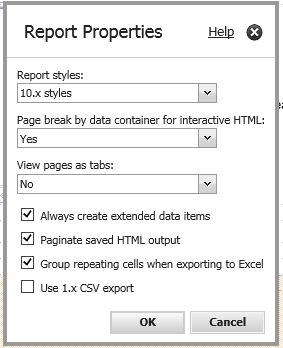
If this doesn’t work make sure you put the Lists/Crosstabs in table cells inside Block.
The announcement states that, On 2018-04-30 IBM will reach End of support for Cognos BI 10.2.x. The link to the announcement can be found here Link at the IBM site.
So if you are one of those shops running Cognos BI 10.2.x, It’s time to start thinking and planning your migration to Cognos Analytics.
to change values of default date prompt dates
below excel sheet gives you the java script for below scenarios
 Data Engineering and BI BLOG