In this blog post, I will describe the step-by-step recovery of a corrupted or misplaced IBM Cognos Framework Manager model. These steps will create an XML file, then run a report against the package of the lost Framework Manager model or project. This process may be used when the Framework Manager project directory was deleted or lost. It will only recover the model for selected package. Next, as you create a blank new project, the necessary files that are created with this process can be replaced, and using the CQEConfig.xml file, the lost or corrupted Framework Manager model can be retrieved.
This method will work for Cognos 8 and Cognos 10.
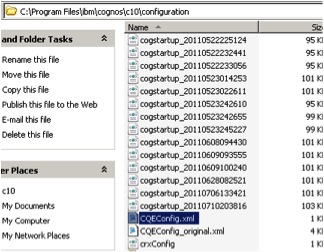
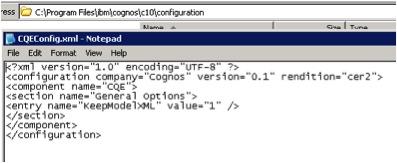
In the current Cognos environment, modify the CQEConfig.xml file as shown here:
f the file does not exist in the location above, you can create an XML file with the following content:
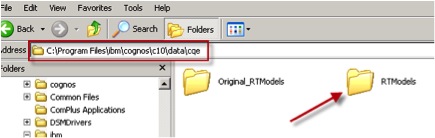
Stop the Cognos services and rename the “RTModels” directory to “Original_RTModels”, as shown here:
Now, restart the Cognos services from Cognos Configuration.
Launch Report Studio from Cognos Connection and create a new report using the package for which the model needs to be recovered.
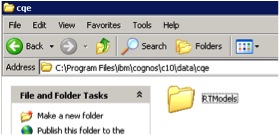
As the report runs, verify that a new “RTModels” folder has been created, as shown. This folder should also contain an XML file, which needs to be used in the next few steps:
Remove the CQEConfig.xml file created in the first step.
Stop the Cognos services.
Now, move the newly created “RTModels” directory to another location (desktop).
Now, rename the “Original_RTModels” folder back to “RTModels” and re-start Cognos services.
Once these steps have been accomplished, in the metadata modeling tool, Framework Manager, create and save a new empty project.
Close this model.
Explore into the folder containing the newly created empty project and change the model.xml file to model.xml.origin.
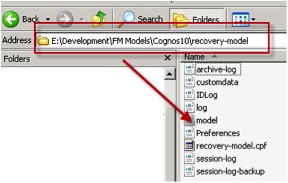
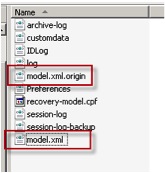
Copy the XML file created in the previous step into the Framework Manager project directory and rename it to model.xml (Note: the model.xml.origin will still exist).
This will enable opening the lost Framework Manager model.
**We can also use CM tools to get this information. Will provide steps when I get some time.
Tags:
Recovering Cognos Framework Manager Models From The Content Store
How to get lost Cognos Framework Manager.
How to Recover a Lost Cognos Framework Manager Model
How to recover a corrupted or lost Framework Manager model.
How to recover a Framework Manager model from the content store
Cognos Framework Manager xml file
Source of the article: http://www.performanceg2.com/recovering-framework-manager-from-content-store/
http://www-01.ibm.com/support/docview.wss?uid=swg21505488
 Data Engineering and BI BLOG