Cognos – pass prompt value to SQL query

To pass a prompt value say – “p_reportdate” to sql query then syntax is as below
select * from table1 where table1.date =  #prompt(‘p_reportdate’)#

if the prompt- “p_name” is multi select then
select * from table2 where table2.name in (#promptmany(‘p_name’)# )


few other related articles
http://www-01.ibm.com/support/docview.wss?uid=swg21341148

How to dynamically name tabs in excel 2007

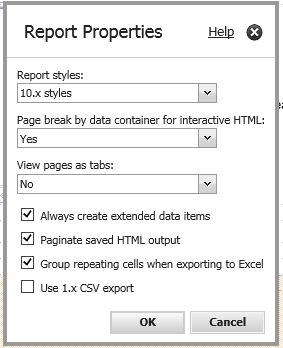
When we use page set, report output in excel will have tab names as page1, pag1_2, page1_3, so on..

If you want to display this tab names by report section names then follow below configuration methods.

In cognos configuration settings at Report service for each dispatcher add below advanced settings

Parameter column, type-  RSVP.EXCEL.PAGEGROUP_WSNAME_ITEMVALUE

Value column, type-  TRUE

Source: https://www.ibm.com/support/knowledgecenter/SSEP7J_10.2.2/com.ibm.swg.ba.cognos.ug_cra.10.2.2.doc/t_ug_cra_adv_prop_name_worksht_tabs_excel2007.html


New database columns not showing up in Cognos framework model

Issue:
When a new column is added at database table, FM model query subject doesn’t reflect new column though SQL used – “select * from table”. Validating object doesnt work either.

Solution:
select the required query subject . At toolbar choose –  “Tools” > “Update Object”. Framework Manager will start verifying the object with the database. As a result the new column will be added to the Query Object.

Page set in Cognos

  1. Create page1
  2. In page1 create a list report say list1 and query1
  3. Now go to page explorer, create a “page Set”
  4. Drag page1 to detail pages
  5. select “page set”. change query to query1.
    At “grouping & sorting” drag required column you would like to group data on.
  6. Run the report. Pages should be separated based on group by element.

Youtube video –

Q. What are determinants. Give me scenario- how do you do it

Determinants define functional dependencies between query items. Use determinants to avoid double-counting in denormalized data
Multi grain means having multiple granularities at FM i.e. we use determinants for this.
Example:
When we want to join 2 tables with different granularity we use determinants.
Determinants are required to avoid double counting of fact data when dimensions connect to fact tables at levels of granularity that have repeating keys. A simple example that illustrates this scenario is that of a time dimension that has months and days. The month will repeat for each day in the month. For example, May 1, May 2, May 3, et cetera. You wouldn’t want to aggregate the values of the month for each day in the month.

The second scenario is one where a query subject behaves as a dimension and has multiple levels of granularity and will be joined to fact data on different sets of keys. For example, the time dimension has multiple levels. It is joined to inventory on the month key because inventory is tracked by month. It is also joined to the sales fact on the day key because sales are tracked by day.

Another less common scenario includes the use of BLOB data types in a query subject. Query and BLOB data type values in a query subject require additional key and indexed information. If this information is not present in the data source, you can add it via determinants.

http://cognosteacher.blogspot.com/2012/01/determinants-explained-with-example.html